

Masterbuilt Gravity 1050: Bypass Panel — From Design to Finished Part
The Masterbuilt Gravity Series 1050 is an excellent smoker. But it has one quirk that eventually annoyed me enough to do something about it: three door sensors — chamber, ash bin, hopper lid — that cut the fan the moment any door opens. This prevents temperatures above 260°C and is intended as a safety feature. In practice it means: take a quick look, door opens, fan stops, temperature drops.
The solution: a bypass panel with three SPST toggle switches that bridge the sensors. Sounds simple. It was — until the printer decided to have a different opinion.
The Problem and the Idea
The three sensors on the MB1050 are connected via JST SM 2-pin connectors — which makes the whole thing manageable. The idea was sketched out quickly:
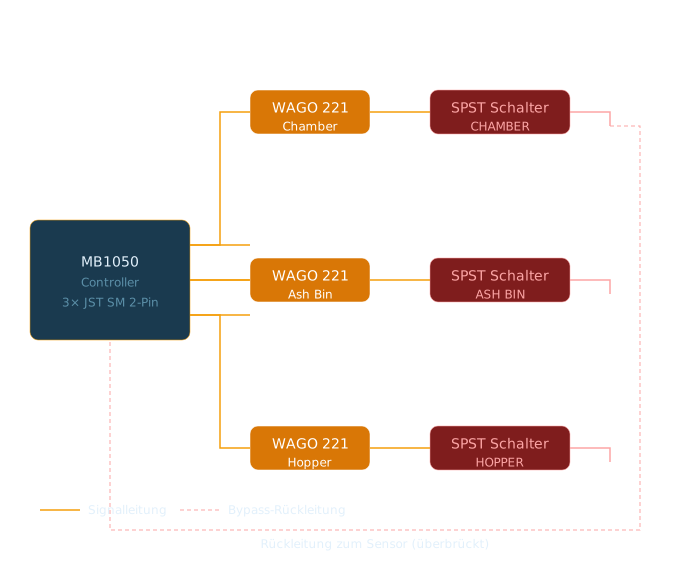
The Bill of Materials
| Component | Specification | Purpose |
|---|---|---|
| SPST toggle switches | With red safety cap | Sensor bypass |
| JST SM 2-pin connectors | Matching original connectors | Plug compatibility |
| WAGO 221-412 connectors | Lever-type terminals | Clean connections |
| Twin-core wire | 2x0.5mm² | Wiring |
| Self-closing braided sleeve | 8mm | Cable management |
| Ruthex threaded inserts | RX-M4x8.1 | Robust fastening |
The Design in Fusion 360
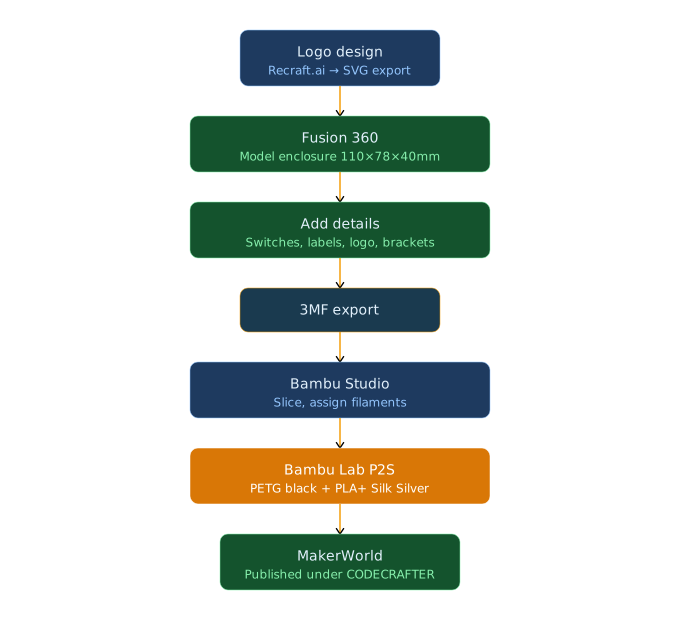
The Housing
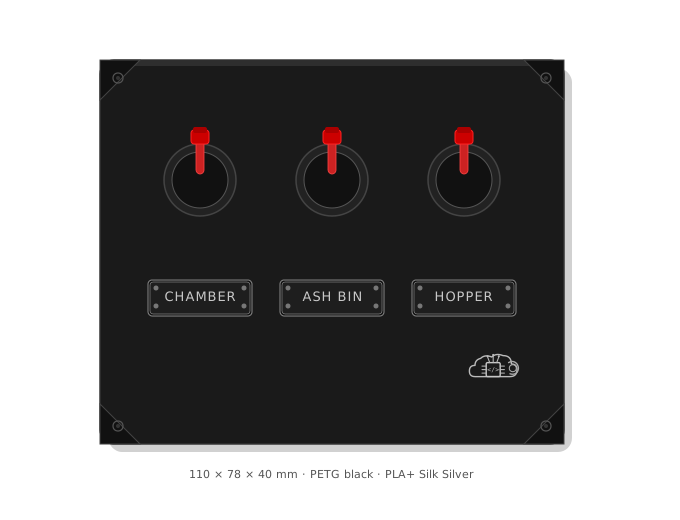
The housing is designed to be functional — but it should look good too. 110x78x40mm, 3mm wall thickness.
What Went Into It
Three Ø13mm holes at the top, evenly spaced, for the toggle switches. Straightforward — but the placement has to be right so the safety caps don’t block each other.
Four mounting brackets diagonally in the corners, each 15x15mm with M4 holes (Ø5.6mm, 10mm deep) for the Ruthex threaded inserts. Heat-set inserts rather than screwing directly into plastic — holds significantly better, especially on something that sits on a smoker and takes vibration.
Three raised label plates — 28x10mm, Impact font, with a frame and small rivets in the corners. CHAMBER / ASH BIN / HOPPER. Easy to read even at a glance.
The Print: What Was Planned and What Happened
This is where it gets honest. And a little painful.
The Plan
Multi-material print on the Bambu P1S:
- ASA+ black for the housing — UV-resistant, heat-resistant, suits the smoker environment
- Silk PLA+ Silver for the label plates and logo — nice contrast, metallic sheen
Sounded good. Bambu Studio even threw a warning — temperature incompatibility between ASA+ (~255°C) and Silk PLA+ (~220°C). It was ignored. Mistake number one.
Problem 1: Delamination
The printed housing showed clear layer separation on the sides. Classic ASA+ moisture problem — the filament had been vacuum-sealed, but had apparently absorbed moisture anyway.
The chain of events was clear: damp filament → delamination → unusable housing. The lesson: always dry ASA+ before printing. At least 4–6 hours at 55–60°C. Even if the filament just came out of vacuum packaging.
Problem 2: Hotend Jam
While ASA+ was in the hotend, the Silk PLA+ bonded in the heatbreak during the material change. The temperature difference was too large — the PLA+ degraded at ASA+ temperatures and caused a massive jam.
The filament could neither be unloaded via the AMS nor pulled out manually. Hours of troubleshooting followed: Bowden tubes disconnected, nozzle removed — the jam was stuck in the heatbreak. Not solvable without a full hotend replacement.
Consequence: New hotend ordered. JUUPINE 3-pack, 0.2/0.4/0.6mm, hardened steel, P1S-compatible. Plus a full printer maintenance planned — extruder cleaning per Bambu Wiki, linear rails, lead screws.
What I Took Away From It
Two clear lessons:
1. Bambu Studio’s temperature warnings are not suggestions — they are stop signs. ASA+ and Silk PLA+ are not compatible in multi-material printing. The software knows this. I ignored the warning. That was a mistake.
2. Always dry ASA+. Vacuum-sealed is not the same as dry. ASA+ is hygroscopic — it actively absorbs moisture from the air. Always put it in the drying box before printing.
The New Plan
After the hotend replacement and printer maintenance, the build continues with a revised material setup:
| Original Plan | New Plan | |
|---|---|---|
| Housing | ASA+ black | PETG black |
| Labels & logo | Silk PLA+ Silver | Silk PLA+ Silver |
| Compatibility | ⚠️ Warning | ✅ No warning |
| Heat resistance | Very high | Sufficient |
| Print difficulty | High | Medium |
PETG is sufficiently heat-resistant for this application — the panel sits on the controller housing, not directly above the heat source. And PETG + Silk PLA+ are temperature-compatible. No warnings, no risk.
What’s Next
Extensive testing — with plenty of delicious BBQ. Sounds tough, but someone’s got to do it. 😉
The project and all design files will be published on MakerWorld under @Codecrafter. Stay tuned.
Conclusion
The bypass panel itself is relatively trivial — but the road to get there was more educational than the result could ever be. ASA+ delamination, hotend jam, material incompatibility — all things you should experience once, so you never have to again.
What I find fascinating about maker projects: there’s no shortcut around hands-on experience. You can read, plan, research — and then the printer does whatever it wants anyway. Or doesn’t.
The housing is coming. And when it’s done, it’ll land on MakerWorld with everything that goes with it — design files, bill of materials, wiring diagram, and the full story of how it got there.
All materials and components were purchased out of pocket — no sponsors, no affiliate links. What’s written here is real experience.
This article reflects my personal views exclusively and has no connection to any professional affiliation.